Table of Contents
- What is Server-Sent Events (SSE)?
- SSE vs WebSocket: Which One Should You Use?
- How to Use SSE with TradingView Data API
- Complete JavaScript Code Example
- Real-World Use Cases
- Event Payload Formats
- Automatic Reconnect Benefits
- Token Management Best Practices
- FAQ
- Conclusion
What is Server-Sent Events (SSE)?
Server-Sent Events (SSE) is a standard web technology that enables servers to push real-time updates to clients over standard HTTP. Unlike traditional request-response patterns where the client must poll for updates, SSE establishes a persistent connection that allows the server to send data whenever new information becomes available.
Key characteristics of SSE:
- One-way communication (server → client only)
- Built on standard HTTP/HTTPS protocols
- Native browser support via the
EventSourceAPI - Automatic reconnection handling built into the browser
- Text-based data format (typically JSON)
This article is for developers building real-time applications who need a simple, reliable way to stream market data without the complexity of WebSocket implementations.
SSE vs WebSocket: Which One Should You Use?
Both SSE and WebSocket enable real-time data streaming, but they serve different use cases. Here’s a side-by-side comparison to help you choose the right protocol for your application.
| Feature | SSE | WebSocket |
|---|---|---|
| Communication | One-way (server → client) | Full-duplex bidirectional |
| Protocol | HTTP/HTTPS | WS/WSS (separate protocol) |
| Browser Support | Native EventSource API | Native WebSocket API |
| Auto-Reconnect | Built-in browser handling | Manual implementation required |
| Firewall/Proxy | Works seamlessly | May require special configuration |
| Message Overhead | Lower (simple text format) | Higher (framing protocol) |
| Binary Data | Not natively supported | Supported |
| Implementation Complexity | Simple | Moderate |
| Best For | Live feeds, notifications, quotes | Chat, gaming, collaborative apps |
When to choose SSE:
- You only need one-way server-to-client data flow
- You want automatic reconnection without extra code
- Your application needs to work through corporate firewalls
- You’re building live dashboards, price tickers, or notification systems
When to choose WebSocket:
- You need two-way communication (client can send commands)
- You require binary data transfer
- You need the lowest possible latency
- You want to send heartbeat pings or subscription changes at runtime
For market data streaming where the primary need is pushing live quotes and price updates from server to client, SSE offers a simpler, more robust solution with built-in reconnection handling.
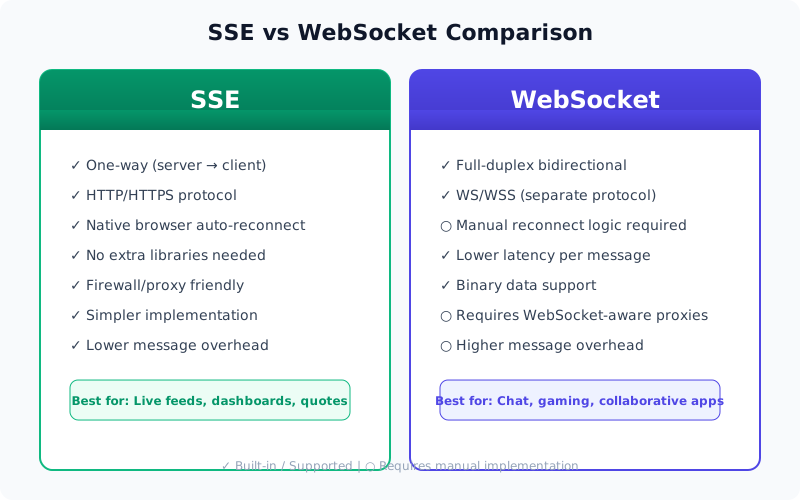
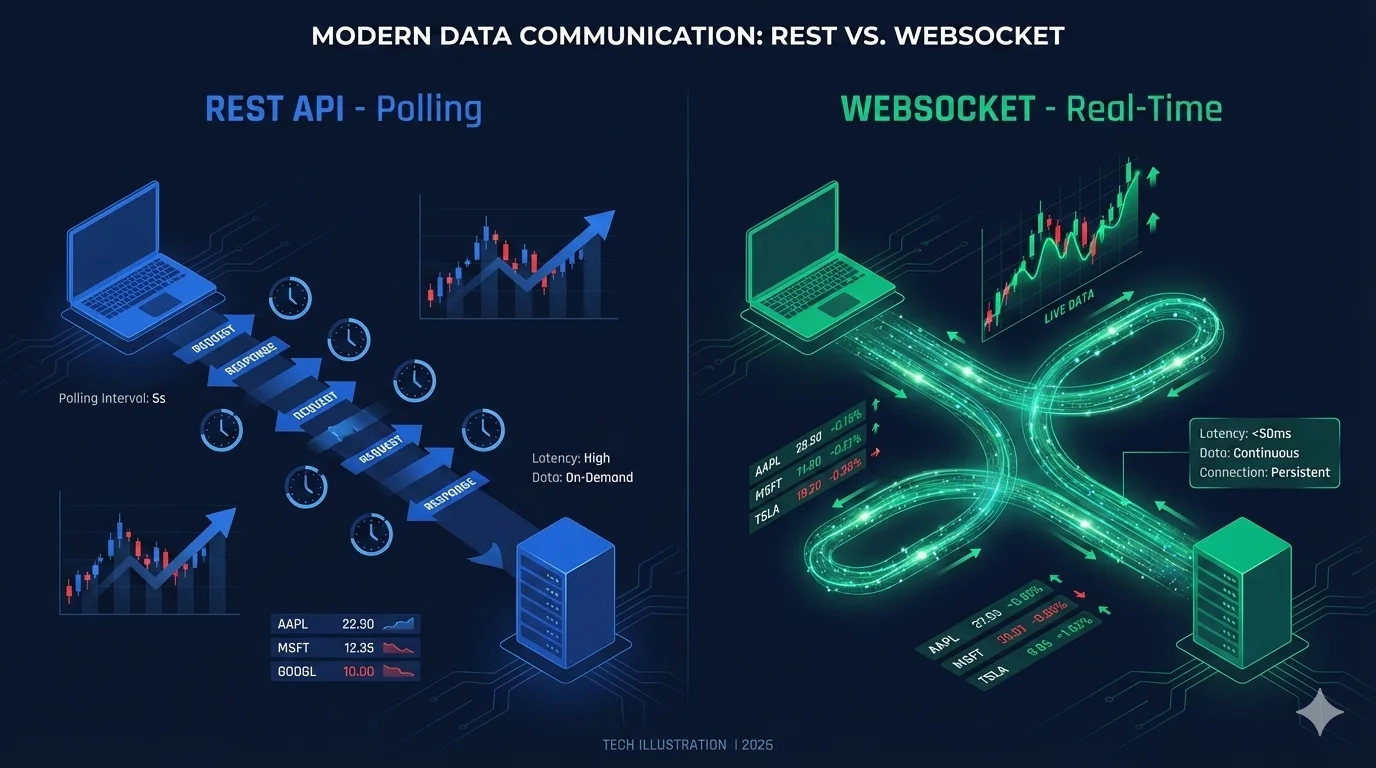
Side-by-side comparison of SSE and WebSocket protocols.
How to Use SSE with TradingView Data API
The TradingView Data API provides a straightforward SSE endpoint for real-time market data streaming. Here’s the complete workflow.
Step 1: Generate a JWT Token
First, generate an authentication token using the /api/token/generate endpoint. This endpoint returns both the token and the SSE URL.
Request:
POST /api/token/generate
Host: api.tradingviewapi.com
Content-Type: application/json
X-RapidAPI-Key: YOUR_RAPIDAPI_KEY
Response:
{
  "success": true,
  "token": "eyJhbGciOiJIUzI1NiIsInR5cCI6IkpXVCJ9...",
  "expiresIn": "6 hours",
  "expiresAt": 1712851200000,
  "sseUrl": "https://ws.tradingviewapi.com/sse/stream"
}
Step 2: Connect to the SSE Stream
Use the sseUrl from the response and append your token and subscription parameters.
Connection URL format:
{sseUrl}?token={YOUR_TOKEN}&symbols={SYMBOLS}&type={TYPE}Required parameters:
token- JWT authentication token from step 1symbols- Comma-separated list of symbols (e.g.,NASDAQ:AAPL,NYSE:TSLA)
Optional parameters:
type- Subscription type:quote(default) orprice
Example connection for quotes:
https://ws.tradingviewapi.com/sse/stream?token=YOUR_TOKEN&symbols=NASDAQ:AAPL,NYSE:TSLA&type=quoteExample connection for price candles:
https://ws.tradingviewapi.com/sse/stream?token=YOUR_TOKEN&symbols=BINANCE:BTCUSDT&type=price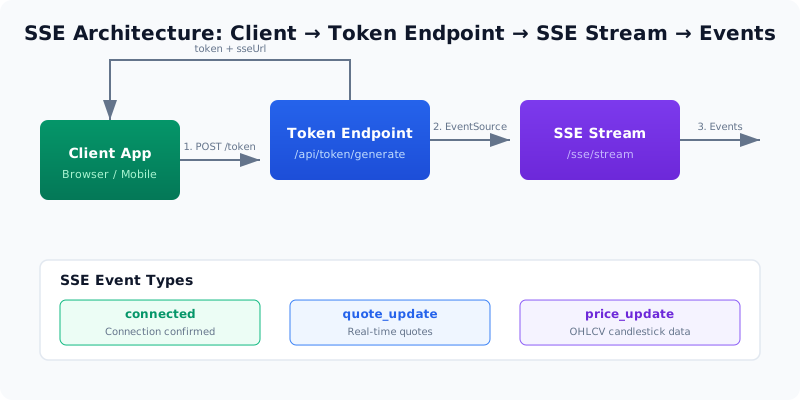
SSE architecture: client generates token, connects to SSE stream, and receives real-time events.
Complete JavaScript Code Example
Here’s a complete working example that demonstrates how to connect to the SSE stream and process real-time market data.
// Step 1: Generate JWT token via REST API
const tokenRes = await fetch('https://api.tradingviewapi.com/api/token/generate', {
    method: 'POST',
    headers: {
        'X-RapidAPI-Key': 'YOUR_RAPIDAPI_KEY',
        'X-RapidAPI-Host': 'tradingview-data1.p.rapidapi.com',
        'Content-Type': 'application/json'
    },
    body: JSON.stringify({})
});

const { token, sseUrl } = await tokenRes.json();
console.log(`Token generated, expires at: ${new Date(tokenRes.expiresAt)}`);

// Step 2: Connect to SSE stream
const symbols = 'NASDAQ:AAPL,NYSE:TSLA,BINANCE:BTCUSDT';
const url = `${sseUrl}?token=${token}&symbols=${symbols}&type=quote`;

const eventSource = new EventSource(url);

// Connection opened
eventSource.onopen = () => {
    console.log('SSE connection established');
};

// Handle incoming messages
eventSource.onmessage = (event) => {
    const data = JSON.parse(event.data);

    switch (data.type) {
        case 'connected':
            console.log(`Connected with client ID: ${data.clientId}`);
            console.log(`Streaming symbols: ${data.symbols.join(', ')}`);
            break;

        case 'quote_update':
            console.log(`${data.symbol}: $${data.data.lp}`);
            // Update UI with new quote
            updateQuoteDisplay(data.symbol, data.data);
            break;

        case 'price_update':
            console.log(`${data.symbol} - O:${data.data.open} H:${data.data.high} L:${data.data.low} C:${data.data.close} V:${data.data.volume}`);
            // Update chart with new candlestick
            updateChart(data.symbol, data.data);
            break;
    }
};

// Handle errors (browser auto-reconnects)
eventSource.onerror = (err) => {
    console.error('SSE error:', err);
    // The browser will automatically attempt to reconnect
    // No additional code needed
};

// Example UI update function
function updateQuoteDisplay(symbol, quoteData) {
    const element = document.getElementById(`quote-${symbol}`);
    if (element) {
        element.textContent = `$${quoteData.lp}`;
    }
}

// To close the connection when done
eventSource.close();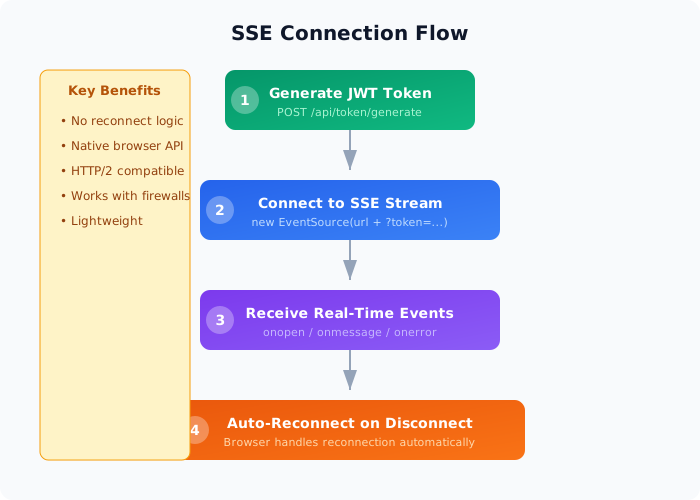
Step-by-step connection flow from token generation to auto-reconnect.
Real-World Use Cases
1. Live Price Dashboard
Build a real-time dashboard that displays live quotes for multiple symbols simultaneously. The browser’s native auto-reconnect ensures your dashboard stays live even during network interruptions.
Connect SSE → Receive quote events → Update UI2. Price Alert System
Monitor streaming prices server-side and trigger alerts when thresholds are crossed. Since SSE works with any HTTP client, you can use it in Node.js backends as well.
Stream prices → Threshold check → Send alerts3. Multi-Symbol Portfolio Tracker
Track a portfolio of symbols with a single SSE connection using comma-separated symbols. Perfect for watchlists and portfolio management apps.
symbols=AAPL,TSLA,BTC → Stream all → Portfolio view4. Candlestick Chart Updates
Receive live OHLCV candlestick data to keep charts updated in real time. Use the type=price parameter.
type=price → OHLCV events → Chart update5. Server-Side Data Pipeline
Stream market data to your backend for processing, storage, or further distribution. SSE works with any HTTP client, including Node.js, Python, and Go.
SSE stream → Process events → Store / forward6. Mobile & Web Apps
Use SSE instead of WebSocket when you only need one-way server-to-client data flow. The lightweight implementation reduces battery consumption on mobile devices.
EventSource connect → Receive events → Render UIEvent Payload Formats
All SSE events are JSON-encoded strings sent as standard data: fields. Here are the three main event types you’ll receive.
Connected Event
Sent immediately after a successful connection, confirming your subscription.
{
  "type": "connected",
  "clientId": "sse_abc123",
  "symbols": ["NASDAQ:AAPL", "NYSE:TSLA"],
  "timestamp": 1712851200000
}
Quote Update Event
Real-time quote data when using type=quote. Contains the latest price information.
{
  "type": "quote_update",
  "symbol": "NASDAQ:AAPL",
  "data": {
    "lp": 195.42,
    "bid": 195.38,
    "ask": 195.45,
    "change": 2.34,
    "change_percent": 1.21,
    "volume": 1234567
  },
  "timestamp": 1712851201000
}
Price Update Event
OHLCV candlestick data when using type=price. Perfect for real-time charting.
{
  "type": "price_update",
  "symbol": "BINANCE:BTCUSDT",
  "data": {
    "open": 68100,
    "high": 68250,
    "low": 67980,
    "close": 68200,
    "volume": 1240.5
  },
  "timestamp": 1712851202000
}
Automatic Reconnect Benefits
One of the most powerful features of SSE is the browser’s native auto-reconnect capability. Here’s why it matters.
How it works:
- When an SSE connection drops, the browser automatically attempts to reconnect
- The reconnection uses exponential backoff to prevent server overload
- No custom code needed — the
EventSourceAPI handles everything
Benefits for your application:
- Reduced complexity - No need to implement reconnect logic
- Better reliability - Browser vendors have battle-tested reconnection algorithms
- Seamless recovery - Users barely notice transient network issues
- Lower maintenance - Fewer edge cases to handle in your code
What you should still handle:
- Token expiration (reconnect with a fresh token)
- UI state restoration after reconnection
- Handling missed messages (consider using
Last-Event-IDfor critical data)
Token Management Best Practices
JWT tokens have expiration times based on your plan. Proper token management ensures uninterrupted streaming.
Token expiration by plan:
- Basic Plan: 30 minutes
- Pro Plan: 24 hours
- Ultra Plan: 7 days
- Mega Plan: 30 days
Best practices:
-
Monitor expiration proactively
const TOKEN_REFRESH_THRESHOLD = 0.85; // Refresh at 85% of lifetime const expiresAt = tokenResponse.expiresAt; const timeUntilExpiry = expiresAt - Date.now(); const refreshTime = timeUntilExpiry * TOKEN_REFRESH_THRESHOLD; setTimeout(() => refreshToken(), refreshTime); -
Implement graceful reconnection
async function refreshToken() { const newToken = await generateNewToken(); eventSource.close(); eventSource = new EventSource(`${sseUrl}?token=${newToken}&symbols=${symbols}`); } -
Monitor expiresAt - Always check the
expiresAtfield in the token response and regenerate before that time. -
Generate new token when 10-15% of time remains - This gives you a buffer for network latency and processing time.
Conclusion
Server-Sent Events (SSE) provides a simple, reliable way to stream real-time market data to your applications. With built-in browser support, automatic reconnection, and straightforward implementation, SSE is an excellent choice for live dashboards, price tickers, and any application that needs one-way server-to-client data streaming.
The TradingView Data API makes it easy to get started with SSE streaming. Generate a JWT token, connect to the SSE endpoint with your desired symbols, and start receiving real-time quote and price updates in minutes.
Key takeaways:
- SSE is simpler than WebSocket for one-way streaming
- Browser-native
EventSourcehandles auto-reconnection automatically - Support for both quote streaming and OHLCV candlestick data
- Works across 353+ global exchanges including stocks, crypto, forex, and futures
- JWT authentication ensures secure connections
Ready to start building? Generate your JWT token and connect to the SSE stream today. Visit our documentation for more details or test your connection using the SSE Test Tool.
Frequently Asked Questions
Yes. SSE works with any JavaScript framework. The EventSource API is browser-native, so you can use it directly in React components, Vue apps, or vanilla JavaScript. The browser handles auto-reconnection automatically.
You can include multiple symbols in the `symbols` parameter as a comma-separated list. The exact limit depends on your plan. For best performance, keep the list to a reasonable size (10-20 symbols per connection).
The SSE connection is automatically terminated when the token expires. You must generate a new token and reconnect. Monitor the `expiresAt` field to proactively refresh your token before expiration.
SSE is designed for real-time streaming only. For historical candlestick data, use the REST API endpoints like `/api/price/{symbol}` which support historical queries with customizable timeframes.
Yes, SSE is supported in all modern browsers including Chrome, Firefox, Safari, Edge, and mobile browsers. Internet Explorer does not support SSE, but you can use polyfills if legacy support is required.
The browser automatically handles reconnection. If you need to detect connection state changes, listen to the `onerror` event and optionally implement a manual reconnection strategy with exponential backoff for scenarios where auto-reconnect isn't sufficient.