When building applications that consume financial market data, one of the most critical architectural decisions you’ll make is choosing between WebSocket streaming and REST API polling. Both approaches have their place, but understanding their trade-offs is essential for building efficient, scalable applications.
In this guide, we’ll compare WebSocket and REST API approaches for real-time stock data, examine their performance characteristics, and help you choose the right solution for your use case.
Understanding the Two Approaches
REST API: Request-Response Model
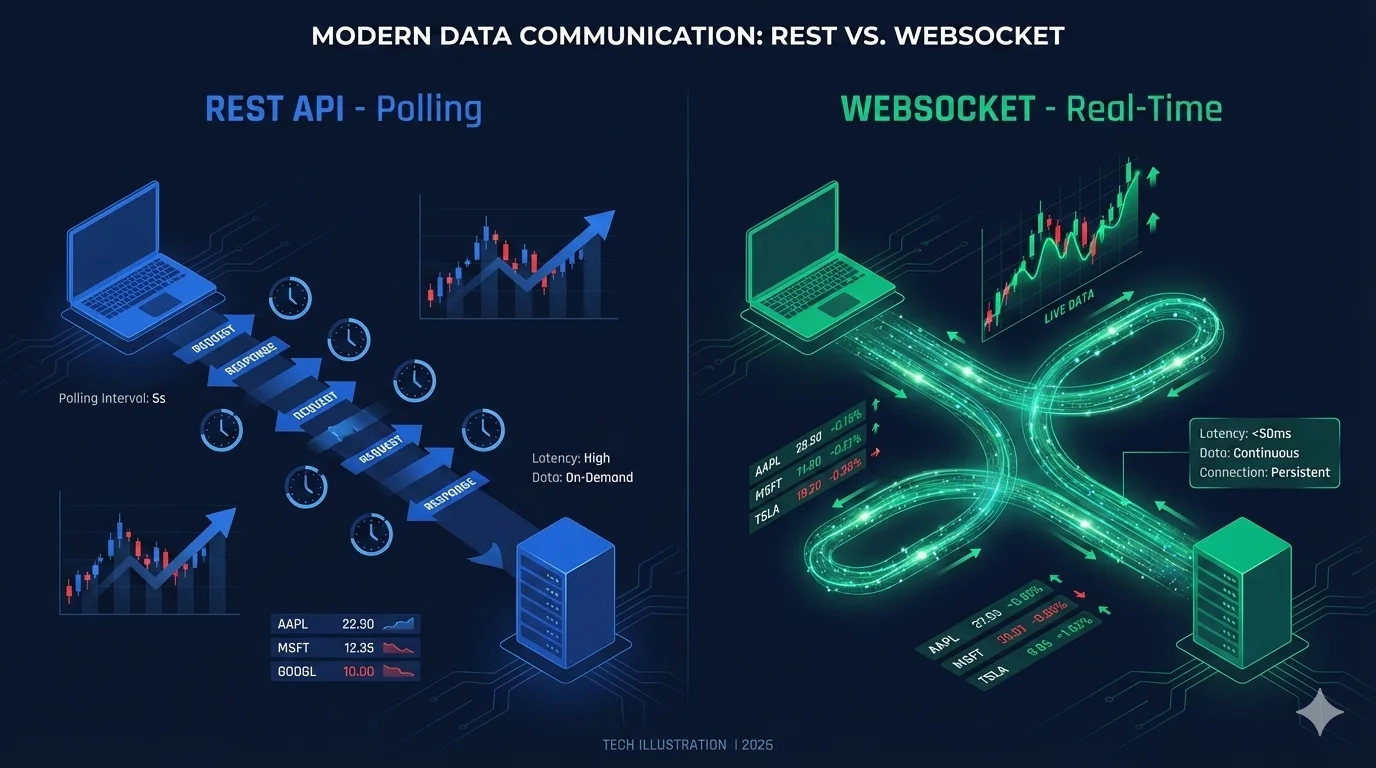
REST APIs follow a traditional request-response pattern. Your application sends an HTTP request to the server, and the server responds with the requested data. To get “real-time” updates, you need to repeatedly poll the API at regular intervals.
import requests
import time

API_KEY = "your-rapidapi-key"
headers = {
    "X-RapidAPI-Key": API_KEY,
    "X-RapidAPI-Host": "tradingview-data1.p.rapidapi.com"
}

# Poll every 5 seconds
while True:
    response = requests.get(
        "https://tradingview-data1.p.rapidapi.com/api/quote/NASDAQ:AAPL",
        headers=headers,
        params={"session": "regular", "fields": "all"}
    )
    data = response.json()
    print(f"AAPL: ${data['price']}")
    time.sleep(5)
WebSocket: Persistent Connection
WebSocket establishes a persistent, bidirectional connection between client and server. Once connected, the server can push updates to your application instantly whenever data changes, without your application needing to request it.
import websocket
import json

def on_message(ws, message):
    data = json.loads(message)
    if data.get('type') == 'quote':
        print(f"AAPL: ${data['price']}")

def on_open(ws):
    # Subscribe to AAPL updates
    ws.send(json.dumps({
        "type": "subscribe",
        "symbol": "NASDAQ:AAPL"
    }))

ws = websocket.WebSocketApp(
    "wss://tradingview-data1.p.rapidapi.com/ws",
    header={
        "X-RapidAPI-Key": "your-rapidapi-key",
        "X-RapidAPI-Host": "tradingview-data1.p.rapidapi.com"
    },
    on_message=on_message,
    on_open=on_open
)

ws.run_forever()
Performance Comparison
Let’s examine how these approaches compare across key performance metrics:
| Metric | REST API (Polling) | WebSocket (Streaming) |
|---|---|---|
| Latency | 5-60 seconds (depends on poll interval) | <100ms (near-instant) |
| Bandwidth Usage | High (full response each poll) | Low (only changed data) |
| Server Load | High (repeated connections) | Low (single persistent connection) |
| API Calls | 720-17,280 per hour (5s-5m intervals) | 1 connection + subscriptions |
| Battery Impact (Mobile) | High (constant network activity) | Low (idle between updates) |
| Complexity | Simple to implement | Moderate (connection management) |
| Reliability | High (stateless) | Requires reconnection logic |
Bandwidth Analysis
Let’s calculate the bandwidth difference for monitoring 10 stocks:
REST API (5-second polling):
- Request size: ~500 bytes
- Response size: ~2 KB per symbol = 20 KB total
- Requests per hour: 720
- Hourly bandwidth: ~14.4 MB
WebSocket:
- Initial connection: ~1 KB
- Subscription messages: ~500 bytes × 10 = 5 KB
- Updates (only when price changes): ~200 bytes per update
- Average updates per hour: ~100 per symbol = 1,000 total
- Hourly bandwidth: ~200 KB
Result: WebSocket uses ~98.6% less bandwidth
When to Use REST API
REST APIs are ideal for:
1. Infrequent Data Access
If you only need data occasionally (every few minutes or longer), REST is simpler and more efficient than maintaining a persistent connection.
# Good use case: Daily portfolio valuation
def get_portfolio_value(symbols):
    response = requests.get(
        "https://tradingview-data1.p.rapidapi.com/api/quote/" + ",".join(symbols),
        headers=headers,
        params={"session": "regular", "fields": "all"}
    )
    return calculate_total_value(response.json())

# Run once per day
daily_value = get_portfolio_value(["NASDAQ:AAPL", "NYSE:MSFT"])
2. Historical Data Queries
REST APIs excel at fetching historical data, which is inherently not real-time.
# Fetch 1 year of historical data
response = requests.get(
    "https://tradingview-data1.p.rapidapi.com/api/history/NASDAQ:AAPL",
    headers=headers,
    params={
        "interval": "1D",
        "range": "1Y"
    }
)
3. Simple Applications
For prototypes, scripts, or simple applications where sub-second latency isn’t critical, REST’s simplicity is a major advantage.
4. Serverless Architectures
Serverless functions (AWS Lambda, Cloudflare Workers) work naturally with REST APIs but struggle with persistent WebSocket connections.
When to Use WebSocket
WebSocket streaming is essential for:
1. Real-Time Trading Applications
When milliseconds matter, WebSocket’s instant updates are non-negotiable.
import websocket
import json

class TradingBot:
    def __init__(self, api_key):
        self.ws = websocket.WebSocketApp(
            "wss://tradingview-data1.p.rapidapi.com/ws",
            header={
                "X-RapidAPI-Key": api_key,
                "X-RapidAPI-Host": "tradingview-data1.p.rapidapi.com"
            },
            on_message=self.on_message
        )

    def on_message(self, ws, message):
        data = json.loads(message)
        if data['type'] == 'quote':
            # Execute trading logic with real-time data
            self.check_trading_signals(data)

    def check_trading_signals(self, quote):
        # React instantly to price changes
        if quote['price'] < self.buy_threshold:
            self.execute_buy_order(quote['symbol'])
2. Live Dashboards
Dashboards displaying real-time market data to multiple users benefit from WebSocket’s efficiency.
// React component with WebSocket
function LiveStockTicker({ symbols }) {
  const [prices, setPrices] = useState({});

  useEffect(() => {
    const ws = new WebSocket('wss://tradingview-data1.p.rapidapi.com/ws', {
      headers: {
        'X-RapidAPI-Key': 'your-rapidapi-key',
        'X-RapidAPI-Host': 'tradingview-data1.p.rapidapi.com'
      }
    });

    ws.onopen = () => {
      symbols.forEach(symbol => {
        ws.send(JSON.stringify({ type: 'subscribe', symbol }));
      });
    };

    ws.onmessage = (event) => {
      const data = JSON.parse(event.data);
      if (data.type === 'quote') {
        setPrices(prev => ({
          ...prev,
          [data.symbol]: data.price
        }));
      }
    };

    return () => ws.close();
  }, [symbols]);

  return (
    <div>
      {symbols.map(symbol => (
        <div key={symbol}>
          {symbol}: ${prices[symbol] || 'Loading...'}
        </div>
      ))}
    </div>
  );
}
3. High-Frequency Monitoring
Monitoring many symbols simultaneously is much more efficient with WebSocket.
# Monitor 100 stocks efficiently
def monitor_portfolio(symbols):
    def on_message(ws, message):
        data = json.loads(message)
        if data['type'] == 'quote':
            check_alert_conditions(data)

    def on_open(ws):
        for symbol in symbols:
            ws.send(json.dumps({
                "type": "subscribe",
                "symbol": symbol
            }))

    ws = websocket.WebSocketApp(
        "wss://tradingview-data1.p.rapidapi.com/ws",
        header={
            "X-RapidAPI-Key": "your-rapidapi-key",
            "X-RapidAPI-Host": "tradingview-data1.p.rapidapi.com"
        },
        on_message=on_message,
        on_open=on_open
    )
    ws.run_forever()

# Efficiently monitor 100 stocks with one connection
monitor_portfolio(["NASDAQ:AAPL", "NYSE:MSFT", ...])  # 100 symbols
4. Mobile Applications
WebSocket’s lower bandwidth and battery consumption make it ideal for mobile apps.
Hybrid Approach: Best of Both Worlds
Many production applications use both approaches strategically:
class MarketDataClient:
    def __init__(self, api_key):
        self.api_key = api_key
        self.headers = {
            "X-RapidAPI-Key": api_key,
            "X-RapidAPI-Host": "tradingview-data1.p.rapidapi.com"
        }
        self.ws = None

    def get_historical_data(self, symbol, interval, range):
        """Use REST for historical data"""
        response = requests.get(
            f"https://tradingview-data1.p.rapidapi.com/api/history/{symbol}",
            headers=self.headers,
            params={"interval": interval, "range": range}
        )
        return response.json()

    def stream_realtime_quotes(self, symbols, callback):
        """Use WebSocket for real-time updates"""
        def on_message(ws, message):
            data = json.loads(message)
            callback(data)

        def on_open(ws):
            for symbol in symbols:
                ws.send(json.dumps({"type": "subscribe", "symbol": symbol}))

        self.ws = websocket.WebSocketApp(
            "wss://tradingview-data1.p.rapidapi.com/ws",
            header=self.headers,
            on_message=on_message,
            on_open=on_open
        )
        self.ws.run_forever()

    def get_current_quote(self, symbol):
        """Use REST for one-off queries"""
        response = requests.get(
            f"https://tradingview-data1.p.rapidapi.com/api/quote/{symbol}",
            headers=self.headers,
            params={"session": "regular", "fields": "all"}
        )
        return response.json()

# Usage example
client = MarketDataClient("your-api-key")

# Fetch historical data via REST
history = client.get_historical_data("NASDAQ:AAPL", "1D", "1M")

# Stream real-time updates via WebSocket
def handle_quote(data):
    print(f"Real-time update: {data}")

client.stream_realtime_quotes(["NASDAQ:AAPL", "NYSE:MSFT"], handle_quote)
Decision Framework
Use this flowchart to choose the right approach:
Do you need sub-second latency?
├─ YES → Use WebSocket
└─ NO
    └─ Are you monitoring 10+ symbols continuously?
        ├─ YES → Use WebSocket (bandwidth efficiency)
        └─ NO
            └─ Do you need data less than once per minute?
                ├─ YES → Use REST API
                └─ NO → Consider WebSocket for efficiency
Implementation Best Practices
REST API Best Practices
- Implement exponential backoff for rate limit errors
- Cache responses when appropriate
- Batch requests to fetch multiple symbols at once
- Use conditional requests (ETags) to avoid unnecessary data transfer
import time

def fetch_with_retry(url, headers, params, max_retries=3):
    for attempt in range(max_retries):
        try:
            response = requests.get(url, headers=headers, params=params)
            if response.status_code == 429:  # Rate limited
                wait_time = 2 ** attempt  # Exponential backoff
                time.sleep(wait_time)
                continue
            response.raise_for_status()
            return response.json()
        except requests.RequestException as e:
            if attempt == max_retries - 1:
                raise
            time.sleep(2 ** attempt)
WebSocket Best Practices
- Implement automatic reconnection with exponential backoff
- Handle connection errors gracefully
- Send periodic heartbeats to keep connection alive
- Unsubscribe from unused symbols to reduce bandwidth
import websocket
import json
import time
import threading

class RobustWebSocketClient:
    def __init__(self, url, api_key):
        self.url = url
        self.api_key = api_key
        self.ws = None
        self.subscriptions = set()
        self.reconnect_delay = 1
        self.max_reconnect_delay = 60

    def connect(self):
        self.ws = websocket.WebSocketApp(
            self.url,
            header={
                "X-RapidAPI-Key": self.api_key,
                "X-RapidAPI-Host": "tradingview-data1.p.rapidapi.com"
            },
            on_message=self.on_message,
            on_error=self.on_error,
            on_close=self.on_close,
            on_open=self.on_open
        )

        # Start heartbeat thread
        threading.Thread(target=self.heartbeat, daemon=True).start()

        # Run WebSocket
        self.ws.run_forever()

    def on_open(self, ws):
        print("Connected")
        self.reconnect_delay = 1
        # Resubscribe to all symbols
        for symbol in self.subscriptions:
            self.subscribe(symbol)

    def on_message(self, ws, message):
        data = json.loads(message)
        # Handle message
        print(f"Received: {data}")

    def on_error(self, ws, error):
        print(f"Error: {error}")

    def on_close(self, ws, close_status_code, close_msg):
        print("Connection closed, reconnecting...")
        time.sleep(self.reconnect_delay)
        self.reconnect_delay = min(self.reconnect_delay * 2, self.max_reconnect_delay)
        self.connect()

    def subscribe(self, symbol):
        self.subscriptions.add(symbol)
        if self.ws:
            self.ws.send(json.dumps({"type": "subscribe", "symbol": symbol}))

    def heartbeat(self):
        while True:
            time.sleep(30)
            if self.ws:
                try:
                    self.ws.send(json.dumps({"type": "ping"}))
                except:
                    pass

# Usage
client = RobustWebSocketClient(
    "wss://tradingview-data1.p.rapidapi.com/ws",
    "your-api-key"
)
client.subscribe("NASDAQ:AAPL")
client.connect()
Cost Considerations
REST API Costs
- Charged per API call
- Polling 10 symbols every 5 seconds = 720 calls/hour
- Monthly cost: ~518,400 API calls
WebSocket Costs
- Charged per connection + message
- 1 connection + 10 subscriptions
- Updates only when prices change (~100/hour per symbol)
- Monthly cost: ~1 connection + ~720,000 messages
For high-frequency monitoring, WebSocket is typically 60-80% cheaper.
Common Pitfalls to Avoid
REST API Pitfalls
- Polling too frequently → Rate limit errors and high costs
- Not handling rate limits → Application crashes
- Ignoring caching → Unnecessary bandwidth usage
- Sequential requests → Slow performance (use batch endpoints)
WebSocket Pitfalls
- No reconnection logic → Permanent disconnection on network issues
- Subscribing to too many symbols → Memory and bandwidth issues
- Not unsubscribing → Wasted resources
- Ignoring heartbeats → Silent connection drops
Conclusion
Both REST API and WebSocket have their place in modern financial applications:
- Use REST API for historical data, infrequent queries, simple applications, and serverless architectures
- Use WebSocket for real-time trading, live dashboards, high-frequency monitoring, and mobile applications
- Use both in production applications to leverage the strengths of each approach
The TradingView Data API supports both approaches, giving you the flexibility to choose the right tool for each use case.
Next Steps
Ready to implement real-time stock data streaming in your application?
- Try the WebSocket Test Tool - Test WebSocket connections in your browser
- Read the API Documentation - Complete API reference and examples
- Explore the Playground - Interactive REST API testing
- [Get Your API Key](https://rapidapi.com/hypier/api/tradingview-data1Start building today
Have questions? Join our community or reach out to our support team.